Unreal接入指引
本文是介绍Unreal SDK的详细文档,包含了基本的接入流程,和高级的接口使用介绍。
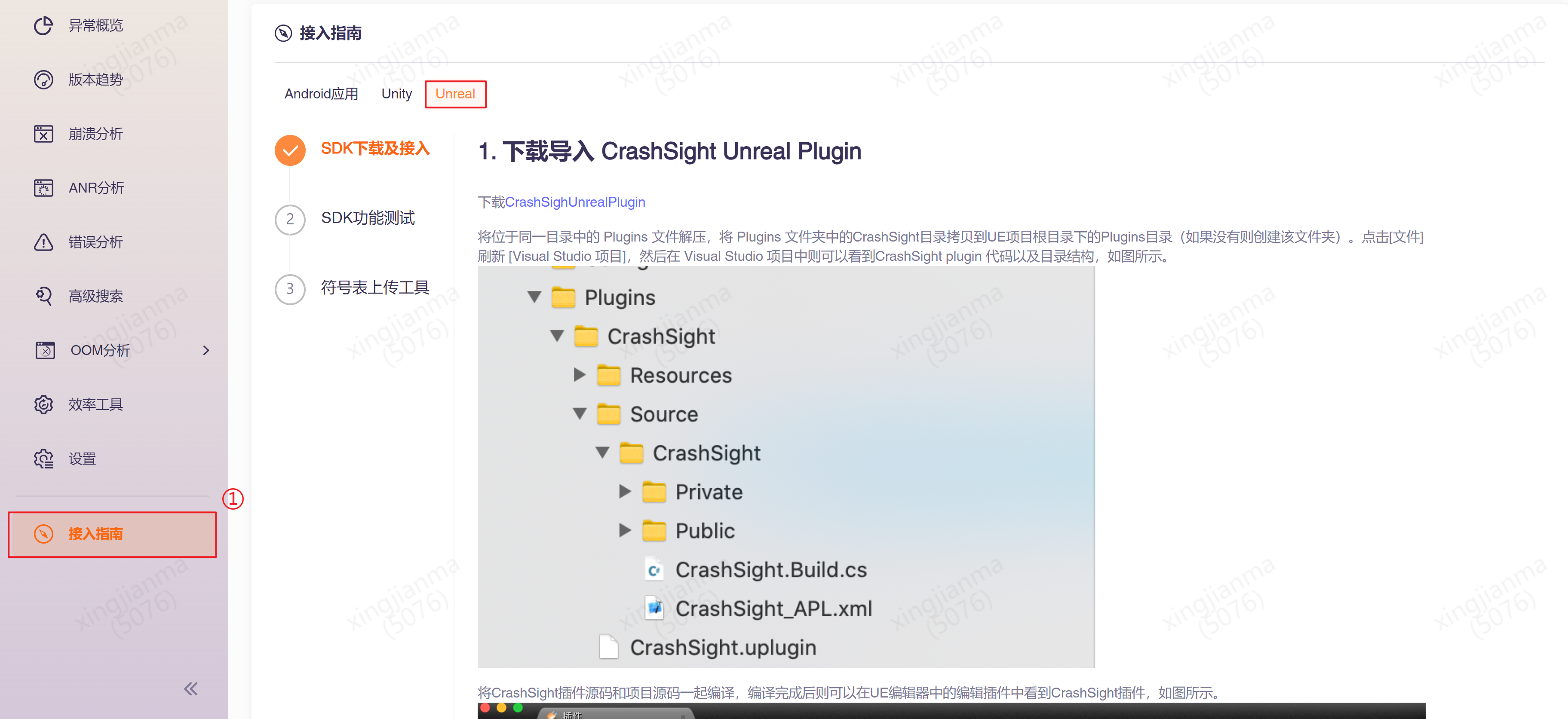
如果想快速接入,验证平台和SDK功能,建议查看项目菜单中的“接入指南”。引导中已经按项目具体的信息(平台,引擎,国内/海外,AppID)生成了针对此项目的初始化代码,可以直接复制使用。如下图所示:
项目创建:公司外部项目支持自助创建项目,但有免费试用时长。公司内部项目,企业微信联系“CrashSight小助手”开通。
本文档适用于CrashSight SDK 4.3.x版本。4.2.x版本接入请参考旧版本Unreal SDK开发接入
1 Unreal引擎接入方案
1.1 导入 CrashSight UE Plugin
-
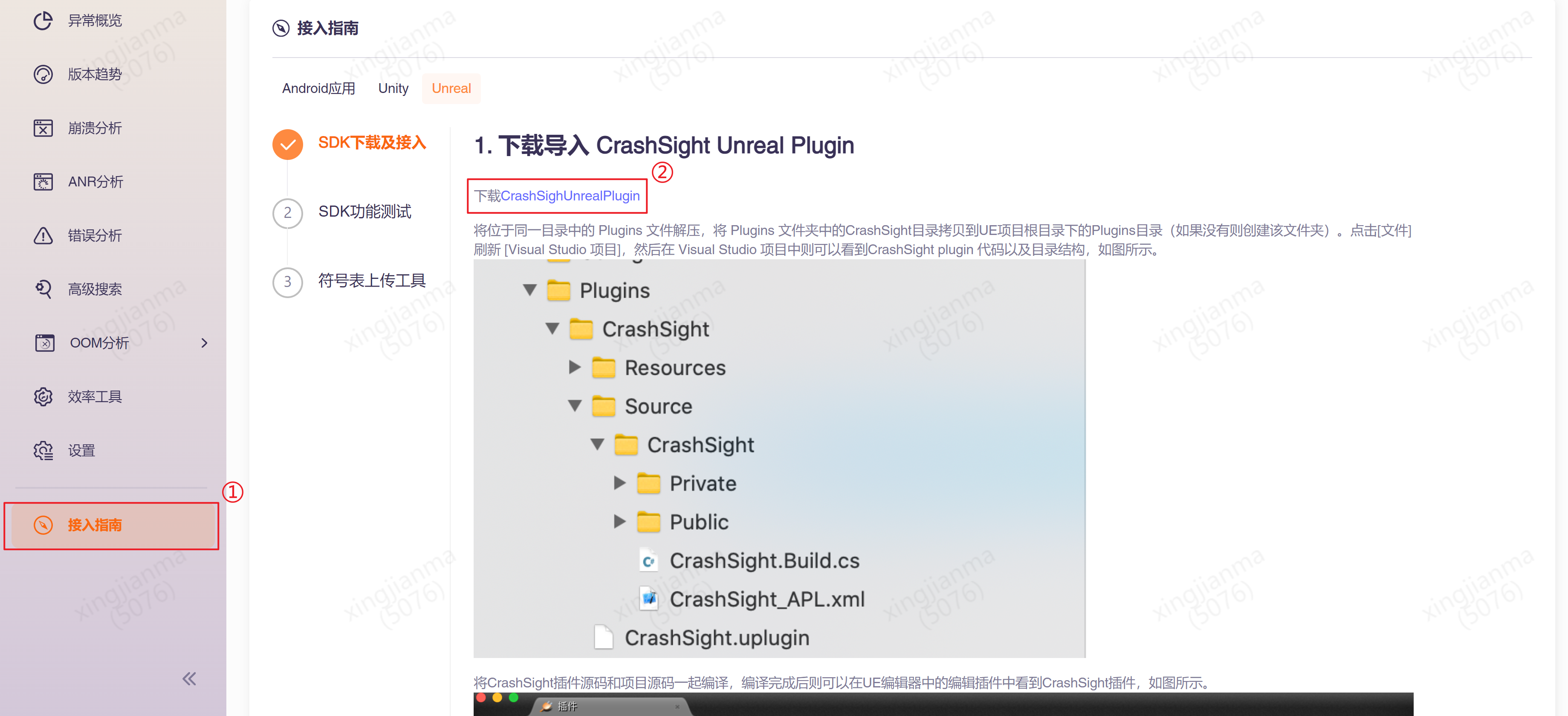
- 在平台成功创建项目后,在侧边栏的“接入指南”中,可以下载到与项目平台和引擎相匹配的SDK。如下图所示:
-
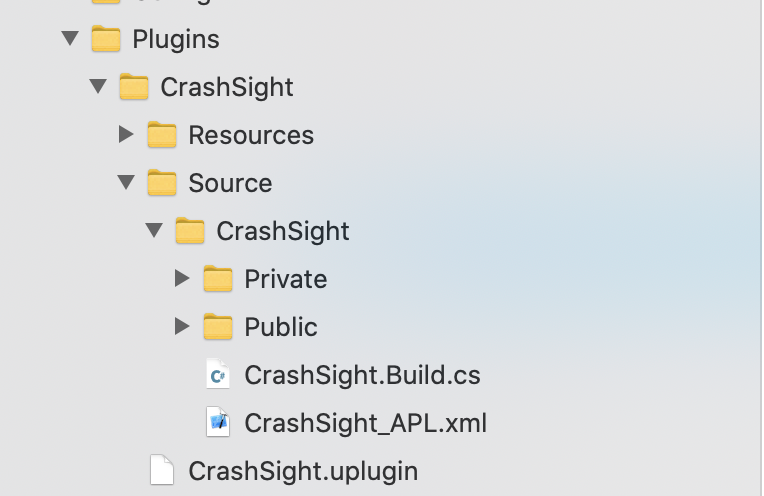
- 将位于同一目录中的 Plugins 文件解压,将 Plugins 文件夹中的CrashSight目录拷贝到UE项目根目录下的Plugins目录(如果没有则创建该文件夹)。点击[文件]刷新 [Visual Studio 项目],然后在 Visual Studio 项目中则可以看到CrashSight plugin 代码以及目录结构,如图所示。
-
- 将CrashSight插件源码和项目源码一起编译,编译完成后则可以在UE编辑器中的编辑插件中看到CrashSight插件,如图所示。

1.2 将CrashSight加入依赖项
在项目主模块的Build.cs中添加:
PrivateDependencyModuleNames.AddRange(new string[] { "CrashSight" });
1.3 执行初始化
- 方法说明 选择第一个场景,或者主场景(scene), 在尽可能较早加载的脚本中调用如下代码进行初始化:
#include "CrashSightAgent.h" //请包含该头文件
using namespace GCloud::CrashSight;
#if DEBUG
        CrashSightAgent::ConfigDebugMode (true);
#endif
// 设置上报域名,请根据项目发行需求进行填写。(必填)
CrashSightAgent::ConfigCrashServerUrl("UploadUrl");
// 设置上报所指向的APP ID, 并进行初始化。APP ID可以在管理端更多->产品设置->产品信息中找到。(必填)
CrashSightAgent::InitWithAppId("AppID");
- 上报域名
国内公有云:
- Android: https://android.crashsight.qq.com/pb/async
- iOS: https://ios.crashsight.qq.com/pb/sync
- Windows: pc.crashsight.qq.com
- Mac: https://mac.crashsight.qq.com/pb/sync
海外公有云:
- Android: https://android.crashsight.wetest.net/pb/async
- iOS: https://ios.crashsight.wetest.net/pb/sync
- Windows: pc.crashsight.wetest.net
- Mac: https://mac.crashsight.wetest.net/pb/sync
1.3.1 Windows配置
Windows平台还需添加崩溃捕获配置。崩溃捕获配置有2种方案,对于可以修改引擎的项目,强烈推荐使用1.3.2.1中的方案,崩溃上报更准确。对于其他使用官方引擎版本的用户,使用1.3.2.2中的配置。
1.3.1.1 接入方案1
- 在引擎源码 \Engine\Source\Runtime\Core\Public\Windows目录下,复制入CrashSightReporter.h
- 在引擎源码 \Engine\Source\Runtime\Core\Private\Windows\WindowsPlatformCrashContext.cpp 中引入CrashSightReporter.h,在函数ReportCrash(某些宏配置下为DefaultReportCrash)函数第一行,调用FCrashSightReporter::ReportCrashToCrashSight(ExceptionInfo);
- 编译引擎
- 在初始化函数CrashSight::CrashSightAgent::InitWithAppId后调用 CrashSight::CrashSightAgent::SetVehEnable(false);
1.3.1.2 接入方案2
- 在初始化函数CrashSight::CrashSightAgent::InitWithAppId后调用 CrashSight::CrashSightAgent::SetVehEnable(true);
- 在CrashSight::CrashSightAgent::SetVehEnable(true);后调用 CrashSight::CrashSightAgent::UnrealCriticalErrorEnable(true);
1.4 Crash Reporter Client接入
Crash Reporter Client是Unreal Engine自带的崩溃上报机制,能够独立捕获并上报崩溃信息。 要通过Crash Reporter Client上报崩溃,请找到项目Config目录中的DefaultEngine.ini,在其中添加:
[CrashReportClient]
CrashReportClientVersion=1.0
DataRouterUrl="https://pc.crashsight.qq.com/csApi/ueCrc/exception/{APPID}/{VERSION}"
如果已有[CrashReportClient]块,则只需修改内容。 然后,进入项目设置->打包->高级,勾选包括崩溃报告器。 Crash Reporter Client的崩溃上报机制完全不依赖CrashSight SDK,可以单独接入,并能提供一些Unreal引擎独有的字段信息。但是需要注意的是,Crash Reporter Client仅上报崩溃,不包含错误上报等重要功能。此外,Crash Reporter Client只能设置一个DataRouterUrl,这导致CrashSight和其它崩溃上报工具不能同时使用Crash Reporter Client。
1.3.2 Mac配置
在接入Mac端时,如果系统提示"CrashSight.dylib"无法打开,请执行以下命令来确保CrashSight.dylib通过MacOS的安全校验:
sudo xattr -r -d com.apple.quarantine path/to/CrashSight.dylib
3 接口说明
全平台接口是指所有平台都通用的接口,覆盖了CrashSight的大部分基础功能,如:初始化、错误上报等。此外,每个平台可能会有一些独有的接口,会在后文单独列出。一个平台上可以使用的全部接口为:全平台接口+该平台独有的接口。
3.1 全平台接口
3.1.1 初始化
static void InitWithAppId(const char* app_id);
说明: 执行初始化工作。 在尽可能早的位置进行初始化以开启崩溃捕获和上报功能。 appid是CrashSight对项目的唯一标识,可以在产品设置->产品信息中查看。
| 参数 | 类型 | 说明 |
|---|---|---|
| app_id | const char* | 已注册项目的APP ID |
3.1.2 上报错误
static void ReportException(int type, const char* name, const char* reason, const char* stack_trace, const char* extras, bool quit, int dump_native_type = 0, bool is_async = true, const char *error_attach_path = nullptr);
说明: 主动上报错误信息。可以在捕获到错误或者需要上报的时候手动调用,支持多线程调用。 name、reason和stack_trace不能为null。
| 参数 | 类型 | 说明 |
|---|---|---|
| type | int | 异常类型, 0~3为内部保留类型传入无效, C#: 4, js: 5, lua: 6 |
| name | const char * | 异常名称 |
| reason | const char * | 异常信息 |
| stack_trace | const char * | 堆栈 |
| extras | const char * | 其他信息 |
| quit | bool | 是否退出 |
| dump_native_type | int | 0:关闭,1:调用系统接口dump,3:minidump(仅移动端有效) |
| is_async | bool | 是否异步(Win、Xbox有效) |
| error_attach_path | const char * | 附件的绝对路径(不支持GBK字符)(Win、Xbox有效) |
static void ReportExceptionW(int type, const char* name, const char* reason, const char* stack_trace, const char* extras, bool quit, int dump_native_type = 0, bool is_async = true, const wchar_t *error_attach_path);
说明: 主动上报错误信息。可以在捕获到错误或者需要上报的时候手动调用,支持多线程调用。支持带支持GBK字符的附件路径,仅Windows端有效。 name、reason和stack_trace不能为null。
| 参数 | 类型 | 说明 |
|---|---|---|
| type | int | 异常类型, C#: 4, js: 5, lua: 6 |
| name | const char * | 异常名称 |
| reason | const char * | 异常信息 |
| stack_trace | const char * | 堆栈 |
| extras | const char * | 其他信息 |
| quit | bool | 是否退出 |
| dump_native_type | int | 0:关闭,1:调用系统接口dump,3:minidump(仅移动端有效) |
| is_async | bool | 是否异步 |
| error_attach_path | const wchar_t * | 附件的绝对路径 |
页面查看:
extras:崩溃详情页->附件下载->extraMessage.txt
dump:崩溃详情页->附件下载->trace.zip
其它:上报错误耗时
| Android | iOS | |||
|---|---|---|---|---|
| 附件大小 | dump堆栈 | 不dump堆栈 | dump堆栈 | 不dump堆栈 |
| 100K | [0.498881]s | [0.003127]s | [0.117762]s | [0.001172]s |
| 10K | [0.464859]s | [0.000730]s | [0.115362]s | [0.000445]s |
| 1K | [0.477934]s | [0.000189]s | [0.117078]s | [0.000293]s |
3.1.3 设置用户ID
static void SetUserId(const char* user_id);
说明: 设置用户ID。用户id默认为unknown。
| 参数 | 类型 | 说明 |
|---|---|---|
| user_id | const char * | 用户ID |
3.1.4 添加自定义数据
static void AddSceneData(const char* key, const char* value);
说明:设置用户自定义的 Key-Value 数据,将在发送 Crash 时随异常信息一起上报,单个key长度限制100字符,单个value限制1000字符,总长度(所有key+value)限制(Android 64KB,iOS 128KB)
页面查看:崩溃详情页->附件下载->valueMapOthers.txt
| 参数 | 类型 | 说明 |
|---|---|---|
| key | const char * | 键 |
| value | const char * | 值 |
3.1.5 设置应用版本
static void SetAppVersion(const char* app_version);
说明:设置应用版本号
Android 默认使用AndroidManifest.xml文件的versionName属性
iOS 配置Info.plist, {CFBundleShortVersionString}.{CFBundleVersion} 组合成app版本号
Win、Xbox暂不可用
备注:需要在InitWithAppId接口之前调用。
| 参数 | 类型 | 说明 |
|---|---|---|
| app_version | const char * | 版本号 |
3.1.6 上报域名设置
static void ConfigCrashServerUrl(const char* crash_server_url);
说明:设置上报域名。
备注:需要在InitWithAppId接口之前调用。
国内公有环境域名如下:
直接接入CrashSight域名与MSDK转接不同,请务必重新依照上述域名配置。其他环境域名请咨询接入接口人。
| 参数 | 类型 | 说明 |
|---|---|---|
| crash_server_url | const char * | 要上报的域名 |
3.1.7 设置上传日志路径
static void SetLogPath(const char* log_path);
说明:设置崩溃后上传的日志路径,需要可读权限。在Android和iOS端上,该接口的优先级低于日志路径回调。Windows端上不支持带GBK字符的附件路径。 PS4、PS5、Switch不可用,鸿蒙暂不可用
| 参数 | 类型 | 说明 |
|---|---|---|
| log_path | const char * | 日志绝对路径 |
static void SetLogPathW(const wchar_t* log_path);
说明:设置崩溃后上传的日志路径,需要可读权限。仅Windows端可用,支持带GBK字符的附件路径。
| 参数 | 类型 | 说明 |
|---|---|---|
| log_path | const wchar_t * | 日志绝对路径 |
3.1.8 debug使能开关
static void ConfigDebugMode(bool enable);
说明:是否开启debug模式,默认为关。开启后会打印一定量的日志,但是可以方便测试期间的问题定位。 Win、Xbox、Linux暂不可用
备注:需要在InitWithAppId接口之前调用。
| 参数 | 类型 | 说明 |
|---|---|---|
| enable | bool | debug使能开关 |
3.1.9 设置设备ID
static void SetDeviceId(const char* device_id);
说明:设置设备ID,默认采用uuid作为设备ID Win、Xbox、PS4、PS5、Switch、鸿蒙暂不可用
备注:需要在InitWithAppId接口之前调用。
| 参数 | 类型 | 说明 |
|---|---|---|
| device_id | const char * | 设备ID |
3.1.10 设置自定义日志上报级别
static void ConfigCrashReporter(int log_level);
说明:设置自定义日志上报级别 Off=0,Error=1,Warn=2,Info=3,Debug=4 , 默认Info。
备注:需要在InitWithAppId接口之前调用。
| 参数 | 类型 | 说明 |
|---|---|---|
| log_level | int | 日志级别 |
3.1.11 自定义日志
static void PrintLog(LogSeverity level, const char* format, ...);
说明:自定义日志,限制30KB
| 参数 | 类型 | 说明 |
|---|---|---|
| level | LogSeverity | 日志级别 |
| format | const char * | 日志格式 |
| args | params object[] | 可变参数 |
static void PrintLog(LogSeverity level, const char* tag, const char* format, ...);
说明:自定义日志,限制30KB Android、iOS、Linux暂不可用
| 参数 | 类型 | 说明 |
|---|---|---|
| level | CSLogSeverity | 日志级别 |
| tag | const char * | 日志标签 |
| format | const char * | 日志格式 |
| args | params object[] | 可变参数 |
自定义日志查看: Android、iOS、PS4、PS5、Switch:问题详情->跟踪日志->custom log Windows、Xbox、Linux:问题详情->自定义日志(来自接口)
3.2 Android、iOS、Mac端接口
3.2.1 回调开关
static void ConfigCallbackType(int32_t callback_type);
说明:各类上报的回调开关,目前是5种类型,用5位表示。第一位表示crash,第二位表示anr,第三位表示u3d c# error,第四位表示js,第五位表示lua,默认全开。
| 参数 | 类型 | 说明 |
|---|---|---|
| callback_type | int32_t | 回调开关 |
3.2.2 设置Android手机型号
static void SetDeviceModel(const char* device_model);
说明:设置手机型号
备注:需要在InitWithAppId接口之前调用。
| 参数 | 类型 | 说明 |
|---|---|---|
| device_model | const char * | 手机型号 |
3.2.3 上报错误
static void ReportExceptionJson(int type, const char* exception_name, const char* exception_msg, const char* exception_stack, const char* params_json, int dump_native_type = 0, const char* errorAttachmentPath = "");
说明: 主动上报错误信息,其它信息必须为Json字符串,可以指定上传附件。
| 参数 | 类型 | 说明 |
|---|---|---|
| type | int | 异常类型, C#: 4, js: 5, lua: 6 |
| exception_name | const char * | 异常名称 |
| exception_msg | const char * | 异常信息 |
| exception_stack | const char * | 堆栈 |
| params_json | const char * | 其他信息, map编码的Json字符串 |
| dump_native_type | int | 0:关闭,1:调用系统接口dump,3:minidump |
| errorAttachmentPath | const char * | 附件的绝对路径 |
页面查看:
paramsJson:崩溃详情页->附件下载->extraMessage.txt
Native堆栈:崩溃详情页->附件下载->trace.zip
3.2.4 上报轻量级日志
static void ReportLogInfo(const char* msg_type, const char* msg);
说明:上报轻量级日志
| 参数 | 类型 | 说明 |
|---|---|---|
| msg_type | const char * | 日志类型 |
| msg | const char * | 日志内容 |
3.2.5 标记场景
static void SetScene(int scene_id);
说明: 设置场景ID
| 参数 | 类型 | 说明 |
|---|---|---|
| scene_id | int | 场景ID |
3.2.6 开启多信号捕获
static void SetCatchMultiSignal(bool enable);
说明: 捕捉来自不同线程的多个信号,并上传第一个信号的信息,默认关闭。
| 参数 | 类型 | 说明 |
|---|---|---|
| enable | bool | 多信号捕获开关 |
3.2.7 启用上报最后一帧
static void SetUnwindExtraStack(bool enable);
说明: 最多回溯256帧,即使栈字符串已满,也会上报最后一帧,默认关闭。
| 参数 | 类型 | 说明 |
|---|---|---|
| enable | bool | 上报最后一帧开关 |
3.2.8 获取崩溃线程ID
static long GetCrashThreadId();
说明: 当崩溃发生时,获取崩溃线程ID,失败时返回-1,可在回调中调用
3.2.9 设置自定义device ID
static void SetCustomizedDeviceID(const char* device_id);
说明: 设置自定义device ID
| 参数 | 类型 | 说明 |
|---|---|---|
| device_id | const char* | 自定义device ID |
3.2.10 获取SDK生成的device ID
static void GetSDKDefinedDeviceID(void* data, int len);
说明: 获取SDK生成的device ID
| 参数 | 类型 | 说明 |
|---|---|---|
| data | void* | 指向用于存放device ID的内存 |
| len | int | data的长度 |
3.2.11 设置自定义match ID
static void SetCustomizedMatchID(const char* match_id);
说明: 设置自定义match ID,match id可用于在“高级搜索”中查找崩溃和错误
| 参数 | 类型 | 说明 |
|---|---|---|
| match_id | const char* | match ID |
3.2.12 获取SDK生成的session ID
static void GetSDKSessionID(void* data, int len);
说明: 获取SDK生成的session ID,session ID用于唯一标记一次启动,一般用于在回调中确定是否为同一次启动。
| 参数 | 类型 | 说明 |
|---|---|---|
| data | void* | 指向用于存放session ID的内存 |
| len | int | data的长度 |
3.2.13 获取上次是否为崩溃退出
static bool IsLastSessionCrash();
说明: 上次是否为崩溃退出,一般在回调中使用
3.2.14 获取上次的用户ID
static void GetLastSessionUserId(void* data, int len);
说明: 一般与IsLastSessionCrash一起使用,在回调中获取上次的用户ID
| 参数 | 类型 | 说明 |
|---|---|---|
| data | void* | 指向用于存放用户ID的内存 |
| len | int | data的长度 |
3.2.15 设置上报线程数
static void SetUploadThreadNum(int num);
说明: 设置上报线程数,默认为3
| 参数 | 类型 | 说明 |
|---|---|---|
| num | int | 设置上报线程数,默认为3 |
3.2.16 设置游戏类型
static void SetGameType(int game_type);
说明: 设置游戏类型,Cocos=1,Unity=2,UE4=3,UE5=4
| 参数 | 类型 | 说明 |
|---|---|---|
| game_type | int | 游戏类型 |
3.2.17 获取崩溃UUID
static void GetCrashUuid(void* data, int len);
说明: 获取当次上报的UUID,该UUID用于唯一标识一次上报,一般在回调中使用
| 参数 | 类型 | 说明 |
|---|---|---|
| data | void* | 指向用于存放崩溃UUID的内存 |
| len | int | data的长度 |
3.2.18 设置logcat缓存大小
static void SetLogcatBufferSize(int size);
说明: 设置logcat缓存大小,默认非debug模式下10KB,debug模式下128KB
| 参数 | 类型 | 说明 |
|---|---|---|
| size | int | logcat缓存大小 |
3.2.19 启动定时dump
static void StartDumpRoutine(int dumpMode, int startTimeMode, long startTime, long dumpInterval, int dumpTimes, bool saveLocal, const char *savePath);
说明: 启动一个线程,定时获取dump并上报。根据dump间隔和dump次数的的设定会产生一定的性能开销,一般用于测试。请在正式发布前关闭该功能。
| 参数 | 类型 | 说明 |
|---|---|---|
| dumpMode | int | dump模式,1:dump,2:minidump |
| startTimeMode | int | 启动时间模式,0:绝对时间,1:相对时间,单位:毫秒 |
| startTime | long | 启动时间 |
| dumpInterval | long | dump间隔,单位:毫秒 |
| dumpTimes | int | dump次数 |
| saveLocal | bool | 是否保存本地 |
| savePath | const char * | 本地保存路径 |
3.2.20 获取异常类型编号
static int GetExceptionType(const char *name);
说明: 根据异常名的字符串获取异常类型编号,可用于填写ReportException接口的type参数
| 参数 | 类型 | 说明 |
|---|---|---|
| name | const char * | 异常类型名,如“c#”、“js”、“lua”、“custom1”等 |
3.2.21 设置回调
public static void SetCrashObserver(UQMCrashObserver *crashObserver)
说明: 回调函数在捕获到崩溃时调用。自定义CSCrashCallBack类,继承UQMCrashObserver,实现OnCrashExtraMessageNotify、OnCrashExtraDataNotify方法
| 参数 | 类型 | 说明 |
|---|---|---|
| crashObserver | UQMCrashObserver | UQMCrashObserver实现 |
示例如下:
CSCrashCallBacks.h
// Fill out your copyright notice in the Description page of Project Settings.

#pragma once

#include "CoreMinimal.h"
#include "UQMCrash.h"

/**
 *
 */
using namespace UQM;

class CRASHSIGHTDEMO_UE_API CSCrashCallBacks : public UQMCrashObserver
{
public:
	CSCrashCallBacks();
	~CSCrashCallBacks();

	const char* OnCrashExtraMessageNotify(int crashType);

	long OnCrashExtraDataNotify(const InnerCrashRet &crashRet);
};
CSCrashCallBacks.cpp
#include "CSCrashCallBacks.h"

CSCrashCallBacks::CSCrashCallBacks()
{
}

CSCrashCallBacks::~CSCrashCallBacks()
{
}

const char* CSCrashCallBacks::OnCrashExtraMessageNotify(int crashType) {
    char str1[] = "this is extra message.";
    char *retValue = SAFE_MALLOC(strlen(str1) + 1, char); //最大长度128*1024字符,超过会截断
    strcpy(retValue, str1);
    return retValue;
}

long CSCrashCallBacks::OnCrashExtraDataNotify(const InnerCrashRet &crashRet) {
    char str[] = "this is extra data.";
    strcpy(crashRet.data, str); //已经分配 128*1024 byte内存,无需再分配,超过会截断
    return strlen(str);
}
Android OnCrashExtraMessageNotify 返回的内容在页面“崩溃详情页->附件下载-extraMessage.txt” Android OnCrashExtraDataNotify 返回的内容在页面“崩溃详情页->附件下载-userExtraByteData”,Base64编码 iOS OnCrashExtraMessageNotify返回的内容在页面“崩溃详情页->附件下载-crash_attach.log” iOS 不调用OnCrashExtraDataNotify接口
callback type对照表:
| callback type | 异常类型 |
|---|---|
| 0 | Java crash |
| 2 | Native crash |
| 3 | c# exception |
| 4 | ANR |
| 5 | JS exception |
| 6 | lua exception |
| 8 | custom error |
3.2.22 设置日志上传回调
页面查看: 崩溃详情-跟踪数据-客户端上报log
public static void SetCrashLogObserver(UQMCrashLogObserver *crashObserver)
说明: 回调函数在上传日志时调用。自定义 MyCrashLogCallback 类,继承UQMCrashLogObserver,实现OnCrashSetLogPathNotify、OnCrashLogUploadResultNotify方法
| 参数 | 类型 | 说明 |
|---|---|---|
| crashObserver | UQMCrashLogObserver | UQMCrashLogObserver的子类 |
示例如下:
MyCrashLogCallback.h
// Fill out your copyright notice in the Description page of Project Settings.

#pragma once

#include "CoreMinimal.h"
#include "UQMCrash.h"

using namespace UQM;
/**
 *
 */
class UQMCRASHSIGHTTEST_API MyCrashLogCallback: public UQMCrashLogObserver
{
public:
	MyCrashLogCallback();
	~MyCrashLogCallback();

    // 设置日志路径回调
    const char* OnCrashSetLogPathNotify(int crashType);

    // 通知日志上传结果回调
    void OnCrashLogUploadResultNotify(int crashType, int result);
};
MyCrashLogCallback.cpp
// Fill out your copyright notice in the Description page of Project Settings.

#include "MyCrashLogCallback.h"

MyCrashLogCallback::MyCrashLogCallback()
{
}

MyCrashLogCallback::~MyCrashLogCallback()
{
}

// 设置日志路径回调
// @param crashType 崩溃类型,0:Java崩溃,2:Native崩溃
// @result 日志的绝对路径,如果非空覆盖SetCrashLogObserver接口设置的路径
const char *MyCrashLogCallback::OnCrashSetLogPathNotify(int crashType)
{
    const char *path = "/data/data/packagename/app_crashSight/log.txt";
    return path;
}

// 通知日志上传结果回调
// @param crashType 崩溃类型,0:Java崩溃,2:Native崩溃
// @param retust 日志上传结果, 0:成功,其它:失败
void MyCrashLogCallback::OnCrashLogUploadResultNotify(int crashType, int result)
{
}
3.3 PC、Xbox端接口
3.3.1 启用Veh异常处理
static void SetVehEnable(bool enable);
说明:VEH捕获开关,默认开。建议所有Unreal项目开启此开关(无需调用),否则可能产生crash漏报。
| 参数 | 类型 | 说明 |
|---|---|---|
| enable | bool | Veh异常处理开关 |
3.3.2 主动上报崩溃
static void ReportCrash();
说明:主动上报一条崩溃信息。一般没有使用场景,可根据项目需要酌情使用。
3.3.3 主动上报dump
static void ReportDump(const char *dump_path, bool is_async);
说明:主动上报Dump。一般没有使用场景,可根据项目需要酌情使用。
| 参数 | 类型 | 说明 |
|---|---|---|
| dump_path | const char * | dump目录 |
| is_async | bool | 是否异步 |
3.3.4 设置崩溃回调
static void SetCrashCallback(CrashCallbackFuncPtr callback);
| 参数 | 类型 | 说明 |
|---|---|---|
| callback | CrashCallbackFuncPtr | 崩溃回调函数指针 |
回调函数定义为:
typedef void (*CrashCallbackFuncPtr)(int type, const char *guid);
| 参数 | 类型 | 说明 |
|---|---|---|
| type | int | 崩溃的类型 |
| guid | const char * | 客户端侧上报ID |
3.3.5 开启额外异常捕获
static void SetExtraHandler(bool extra_handle_enable);
说明:设置额外的异常处理机制,默认为关闭,与旧版保持一致。 开启后,可以捕获上报strcpy_s一类的安全函数抛出的非法参数崩溃,以及,虚函数调用purecall错误导致的崩溃。
| 参数 | 类型 | 说明 |
|---|---|---|
| extra_handle_enable | bool | 额外异常捕获开关 |
3.3.6 上传dump文件
static void UploadGivenPathDump(const char *dump_dir, bool is_extra_check);
说明:上传指定路径下的dump文件
| 参数 | 类型 | 说明 |
|---|---|---|
| dump_dir | const char * | dump文件地址 |
| is_extra_check | bool | 默认填false即可 |
3.3.7 UE Critical Error上报
static void UnrealCriticalErrorEnable(bool enable);
说明:设定是否上报UE的Critical Error,默认关。Unreal项目请打开。安卓项目还需开启Critical Error上报
| 参数 | 类型 | 说明 |
|---|---|---|
| enable | bool | UE Critical Error上报开关 |
3.3.8 仅上报首条崩溃开关
static void OnlyUploadFirstCrash(bool enable);
说明:开启后,每次启动仅会上报首个捕获的崩溃,防止重复上报。仅在VEH捕获关闭时生效
| 参数 | 类型 | 说明 |
|---|---|---|
| enable | bool | 仅上报首条崩溃开关 |
3.4 PS4、PS5、Switch端接口
3.4.1 设置错误上报间隔
static void SetErrorUploadInterval(int interval);
说明:设置错误上报间隔,默认30s
| 参数 | 类型 | 说明 |
|---|---|---|
| interval | int | 错误上报间隔 |
3.4.2 错误上报开关
static void SetErrorUploadEnable(bool enable);
说明:是否开启错误上报,默认开启
| 参数 | 类型 | 说明 |
|---|---|---|
| enable | bool | 错误上报开关 |
3.5 Linux端接口
3.5.1 设置所有记录文件的路径
static void SetRecordFileDir(const char* record_dir);
说明:设置所有记录文件的路径,包括SDK日志和dump文件,默认为当前可执行文件的目录下。
| 参数 | 类型 | 说明 |
|---|---|---|
| record_dir | const char* | 记录文件路径 |
4.安卓额外操作
4.1 开启Critical Error上报
在Android平台上,Unreal引擎将Critical Error的退出方式设为正常退出,导致CrashSight无法直接捕获这一类崩溃。为了捕获Critical Error,需要找到UE引擎代码如下位置:
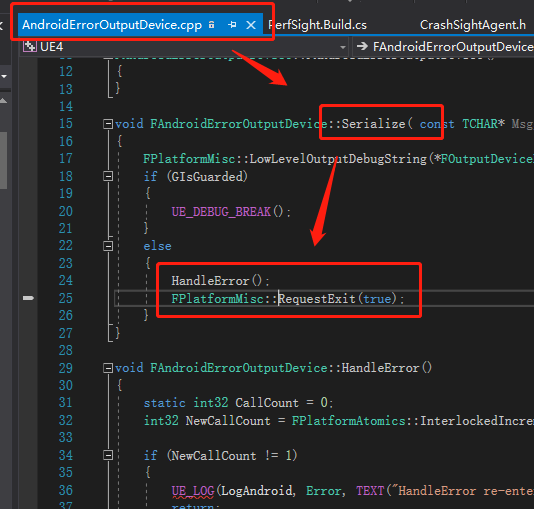
将
FPlatformMisc::RequestExit(true);
改为
abort();
iOS的Critical Error是以崩溃方式退出,因此无需更改。
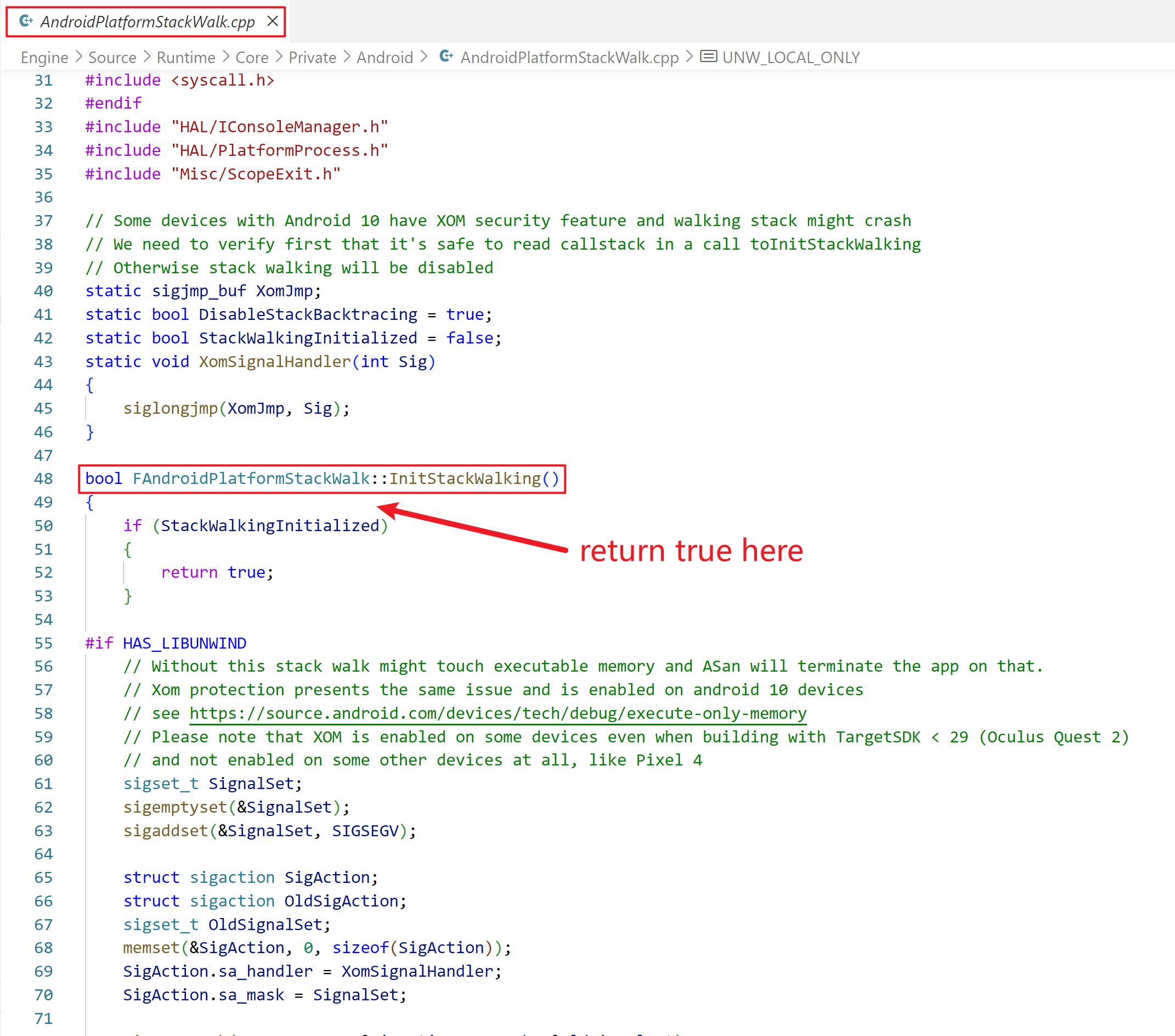
4.2 UE5.1及以上unwind问题修复
Unreal engine 5.1及以上打包的Android项目会出现unwind崩溃问题,导致native crash上报失败。以下是通过修改源码来避免unwind崩溃问题的方法:
4.3 配置native库提取
未提取的native库会导致获取的崩溃堆栈无法还原。这种情况的表现为,堆栈中的崩溃模块是xx.apk而非xx.so,不能定位到具体的库。
为了避免未提取的native库对堆栈还原造成影响,请做如下配置:
找到UE项目Config目录下的DefaultEngine.ini文件,在
[/Script/AndroidRuntimeSettings.AndroidRuntimeSettings]
版块中添加配置
bExtractNativeLibs=True
通过添加此参数,操作系统可以在应用程序崩溃时提供额外的信息,以帮助分析崩溃的原因。
5.接入结果测试
CrashSight测试接口
测试Java崩溃(仅Android)

static void TestJavaCrash();

测试Object-C崩溃(仅iOS)

static void TestOcCrash();

测试Native崩溃(Android、iOS,未来将支持全平台)

static void TestNativeCrash();

测试OOM崩溃(Android、iOS)

static void TestOomCrash();

测试ANR(仅Android)

static void TestANR();

测试释放后使用内存,仅GWP_Asan或MTE功能启用后生效(Android)

static void TestUseAfterFree();
5.1. iOS测试方法:
- a. 开启Debug模式,初始化CrashSight,并给定合适的配置参数
- b. 联网上报:检查测试设备日志中是否打印“begin to upload <CSAnalyticsLogic” 或者 “cmd: 641”
- c. 崩溃捕获:检查测试设备日志中是否打印“Handle the crash scene in callback”
- d. 上报异常:检查测试设备日志中是否打印“begin to upload <CSCrashLogic” 或者 “cmd: 631”
5.2. Android测试方法:
- a. 开启Debug模式,初始化CrashSight,并给定合适的配置参数
- b. 联网上报:检查logcat日志是否打印“[Upload] Run upload task with cmd: 840”
- c. 崩溃捕获:检查logcat日志是否打印“HandleSignal start”
- d. 上报异常:检查logcat日志是否打印"[Upload] Run upload task with cmd: 830"
5.3. Windows测试方法:
-
a.初始化CrashSight后,联网上报是否正常,具体验证方法如下:
- 初始化CrashSight;
- 5分钟后,在管理端页面的 异常概览 --> 崩溃趋势 --> 联网设备数 中可以看到统计数值大于等于1.
-
b.游戏发生崩溃,是否能正确上报,具体验证方法如下:
- 初始化CrashSight;
- 在游戏内可以由以下代码触发崩溃。(其他类似的坏内存访问也可以)
int* a = NULL;
a[10000] = 5; -
c.查看CrashSight64/dump目录(旧版本为TQM64/dump)下是否有dmp文件生成。如果没有,说明无法成功捕获崩溃,请联系CrashSight开发.
-
d.查看管理端页面 “崩溃分析”页上,是否有对应时间点的上报。如果3有,4没有,说明没有成功上报。请检查APPID配置(两个配置文件均要正确),以及APP KEY配置,是否对应且与应用设置中一样。如果配置正确,还无法上报,请联系CrashSight开发.
-
e.崩溃上报的版本号,用户名是否与设置一致.
-
f.错误上报的版本号,用户名是否与设置一致.
6.上传符号表
以上内容介绍了SDK的接入,崩溃上报和验证,但要在页面上看到可读的还原堆栈,还需要上传对应的符号表,请见 符号表上传工具使用说明