Unity Integration Guidelines
This document applies to CrashSight SDK 4.3.x version. For 4.2.x version, please refer to old version of Unity SDK Integration Document
1 Unity C# Integration
1.1 Download and Import Unity Plugin to Unity Project
After creating a project on the platform, the SDK that matches the platform and engine of the project can be downloaded from the "Tutorial" in the sidebar, as shown in the figure below:
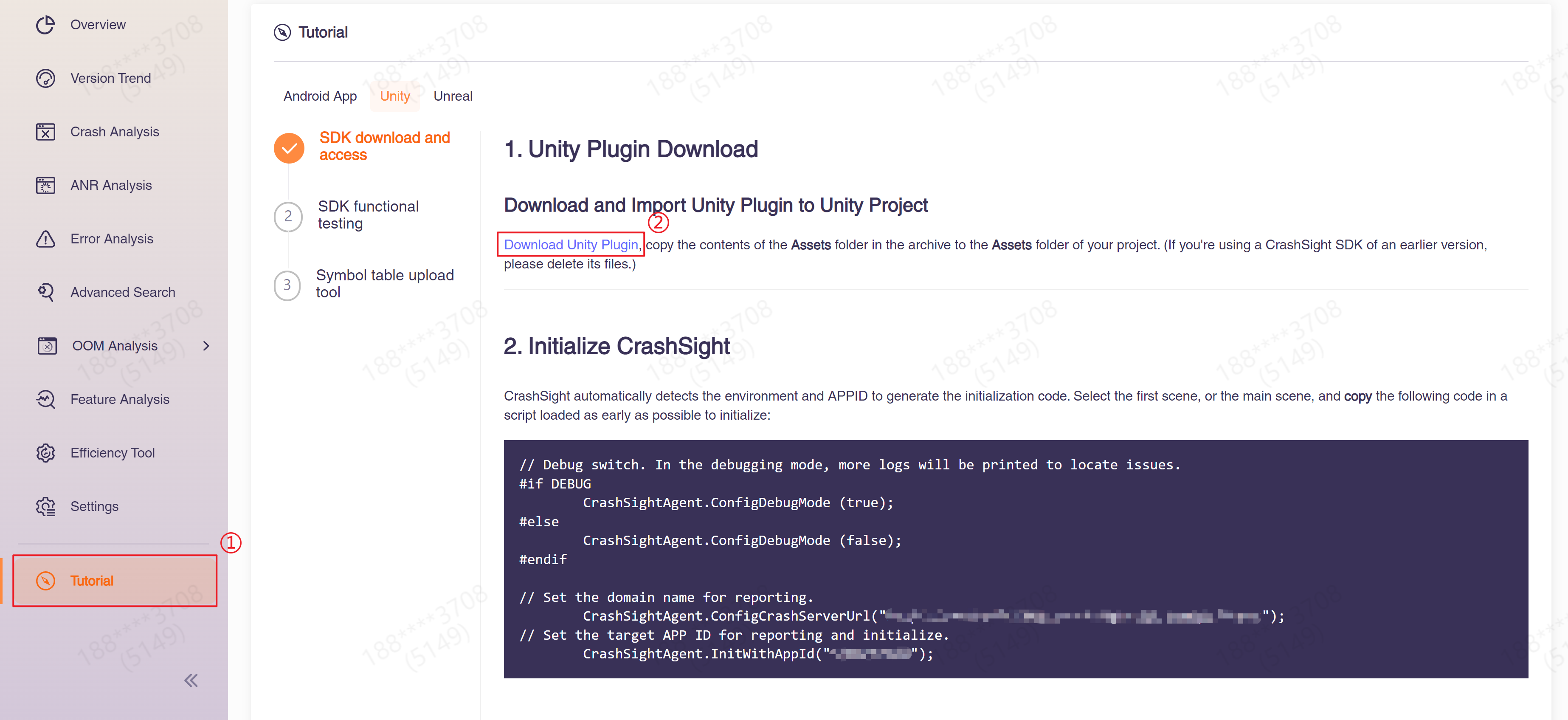
1.2 Initialize CrashSight
Choose the first scene or the main scene, and call the following code in a script loaded as early as possible to initialize:
// Debug switch. In the debugging mode, more logs will be printed to locate issues.

#if DEBUG
        CrashSightAgent.ConfigDebugMode (true);
#endif

//  Set the target domain name to report to. Please fill in according to project requirements. (required)
        CrashSightAgent.ConfigCrashServerUrl(CrashSightUploadUrl);
// Set the target APP ID for reporting and initialize. You can find the APP ID from More->Product Settings->Product Info of the management console.
        CrashSightAgent.InitWithAppId(CrashSightAppID);
Domain name for reporting
Local(China) public cloud:
- Android: https://android.crashsight.qq.com/pb/async
- iOS: https://ios.crashsight.qq.com/pb/sync
- Harmony: https://harmony.crashsight.qq.com
- Windows: pc.crashsight.qq.com
- Mac: https://mac.crashsight.qq.com/pb/sync
- PS5: https://ps5.crashsight.qq.com/pb/async
- Xbox: xbox.crashsight.qq.com
International public cloud
- Android: https://android.crashsight.wetest.net/pb/async
- iOS: https://ios.crashsight.wetest.net/pb/sync
- Harmony: https://harmony.crashsight.wetest.net
- Windows: pc.crashsight.wetest.net
- Mac: https://mac.crashsight.wetest.net/pb/sync
- PS5: https://console.crashsight.wetest.net/pb/async
- Xbox: xbox.crashsight.wetest.net
1.3 Integration Configurations
1.3.1 Integration Configurations for iOS
- 1)Change the project's preferences in Unity (Build Settings) a. Press Ctrl+Shift+B to open the Build Settings panel. Click Player Settings and switch to the Setting for iOS tab. Choose the Other Settings bar, and change the Script Call Optimization of Optimization to Slow and Safe.
- 2)Change the compilation configuration of the exported Xcode project. Switch to the Build Phases tab, and add the following dependencies under Link Binary With Libraries:
- libc++.dylib or libc++.tdb is for importing the c++ standard library.
- libz.dylib or libz.tdb is for compressing reported data
- Security.framework is for storing keychain
- SystemConfiguration.framework is for reading system info in case of an exception
- MetricKit.framework is for obtaining app diagnostic information provided by apple (weak reference, please select “optional”).
- OSLog.framework is for getting the NSLog log information (weak reference, please select “optional”).
- CFNetwork.framework is for getting VPN status.
Note:
- i. If these dependencies have been added to the project, no need to add them again.
- ii. If XUPorter is used to integrate, there's no need to add configuration items in Xcode.
1.3.2 Integration Configurations for Android (Configuring native library extraction)
Unextracted native libraries may cause crash stack cannot be symbolicated. This is manifested by the fact that the crash module in the stack is xx.apk instead of xx.so and cannot be localized to a specific library. In order to avoid the impact of unextracted native libraries on the stack symbolication, please do the following configuration:
(1)When packaging APK, go to Project Settings -> Player -> Build, check "Custom Main Manifest" and configure android:extractNativeLibs=“true” in AndroidManifest.xml
<application
    ...
    android:extractNativeLibs="true">
(2)When packaging AAB, go to Project Settings -> Player -> Build, check "Custom Gradle Properties Template" and add the following configuration to gradleTemplate.properties:
enableUncompressedNativeLibs = false
By adding this parameter, the operating system can provide additional information in the event of an application crash to help analyze the cause of the crash.
1.3.3 Integration Configurations for Harmony
After exporting the Dev Eco project, you need to rename CrashSightBridge.ts to CrashSightBridge.ets and then package it.
1.4 Unity Integration Demo
- 1)Double-click the CrashSightPlugin.unitypackage package in the downloaded plugin. The following screen will appear in Unity. Import the plugin.

- 2) Initialize.
private const string CrashSightAppIDForiOS = "685a68759e";
private const string CrashSightAppIDForAndroid = "e6af377f84";
private const string CrashSightUploadUrliOS = "https://ios.crashsight.qq.com/pb/sync";
private const string CrashSightUploadUrlAndroid = "https://android.crashsight.qq.com/pb/async";

        CrashSightAgent.ConfigDebugMode (true);
#if UNITY_IPHONE || UNITY_IOS
        CrashSightAgent.ConfigCrashServerUrl(CrashSightUploadUrliOS);
        CrashSightAgent.InitWithAppId(CrashSightAppIDForiOS);
#elif UNITY_ANDROID
        CrashSightAgent.ConfigCrashServerUrl(CrashSightUploadUrlAndroid);
        CrashSightAgent.InitWithAppId(CrashSightAppIDForAndroid);
#endif
- 3) Integration for iOS is similar to that of Android, but the project must be packed as an Xcode project and configurations should be done in the Xcode project.
1.5 Integration Result Testing
CrashSight Test Interface
Test Java crash (Android)

static void TestJavaCrash();

Test Object-C crash (iOS)

static void TestOcCrash();

Test Native crash(Android & iOS, will support all platforms in the future)

static void TestNativeCrash();

Test OOM crash (Android、iOS)

static void TestOomCrash();

Test ANR (Android)

static void TestANR();

Test for using memory after release, only effective when GWP_Asan or MTE function is enabled (Android)

static void TestUseAfterFree();

Force Unity to crash (available on all platforms)

UnityEngine.Diagnostics.Utils.ForceCrash(ForcedCrashCategory.AccessViolation);
1.5.1 Testing Method for iOS
- a. Enable Debug mode. Initialize CrashSight and assign suitable config parameters
- b. Network and report: Check if "begin to upload <CSAnalyticsLogic" or "cmd: 641" is printed in the test device log
- c. Crash detection: Check if "Handle the crash scene in callback" is printed in the test device log
- d. Report exceptions: Check if "begin to upload <CSCrashLogic" or "cmd: 631" is printed in the test device log
1.5.2 Testing Method for Android
- a. Enable Debug mode. Initialize CrashSight and assign suitable config parameters
- b. Network and report: Check if "[Upload] Run upload task with cmd: 840" is printed in the logcat log.
- c. Crash detection: Check if "HandleSignal start" is printed in the logcat log
- d. Report exception: Check if "[Upload] Run upload task with cmd: 830" is printed in the logcat log.
1.5.3 Testing Method for Windows
-
a.Verify if CrashSight can connect to the internet and report normally. The verification process is:
- Initialize CrashSight;
- Wait 5 minutes and go to Exception Overview --> Crash Tendency --> Number of Devices Connected in the management console. The stats should be equal to or higher than 1.
-
b.Verify if a crash can be reported normally. The verification process is:
- Initialize CrashSight;
- You can trigger a crash in the game using the following code. (You can also use other bad memory access methods)
int* a = NULL;
a[10000] = 5; -
c.See if there is a generated dmp file under CrashSight64/dump(TQM64/dump for older versions) path. The crash is not successfully captured if you are unable to find the file. In this case, please contact CrashSight developer.
-
d.Go to "Crash Analysis" in the management console and see if there is a report with the corresponding time stamp. If you see the dmp file in step 3 but are unable to find the report in step 4, the crash was not successfully reported. Please check APPID config (Both config files need to be correct) and the APP KEY config if they correspond to each other and are the same in the application config. If it still fails to report using the correct config, please contact CrashSight developers.
-
e.Check if the version number and the user name of the crash report is the same as the configuration.
-
f.Check if the version number and the user name of the error report is the same as the configuration.
1.6 Upload Symbol Table
The above is an introduction to SDK Integration, crash reporting and verifying, but to see readable symbolicated stacks on the page, you need to upload the corresponding symbol table. Please seeSymbol Table Uploading Tools Guide
1.7 Configuring USYM Symbolication
This step supplies C# file names and line numbers for IL2CPP stack traces. Currently supports Android and iOS platforms.
Before project build:
Projects using Unity 6 only requires changing one setting:
Go to Project Settings -> Player -> Android -> Other Settings -> IL2CPP StackTrace Information, and set the option to "Method Name, File Name, and Line Number".

For projects using Unity 2022 and below:
Replace the usymtool. Since only the Unity6 version of usymtoolcan correctly generate usable .usymfiles, copy usymtoolfrom a Unity6 installation to your current engine.
When building on Windows, the location of usymtool is: PathToUnityEngine\Editor\Data\Tools\usymtool.exe
When building on Mac, the location of usymtool is: PathToUnityEngine/Contents/Tools/macosx/usymtool
Replacing usymtool enables usym symbolication for crash stack traces in Unity 2022 and below. If you need to symbolicate C# exception stacks or Unity Log error stacks, additional engine source code modifications are required. Refer to the following code changes in:
PathToUnityEngine/Data/il2cpp/libil2cpp/icalls/mscorlib/System.Diagnostics/StackTrace.cpp:
#if !IL2CPP_TINY
#include "il2cpp-config.h"
#include "il2cpp-class-internals.h"
#include "il2cpp-object-internals.h"
#include "gc/WriteBarrier.h"
#include "vm/Array.h"
#include "vm/Object.h"
#include "vm/Reflection.h"
#include "icalls/mscorlib/System.Diagnostics/StackTrace.h"
#include "vm-utils/DebugSymbolReader.h"
#include "vm/String.h"
namespace il2cpp
{
namespace icalls
{
namespace mscorlib
{
namespace System
{
namespace Diagnostics
{
    static Il2CppArray* GetTraceInternal(Il2CppException* exc, int32_t skip, bool need_file_info)
    {
        Il2CppArray* trace_ips = exc->trace_ips;
        Il2CppArray* nativetrace_ips = exc->native_trace_ips;
        /* Exception is not thrown yet */
        if (trace_ips == NULL)
            return vm::Array::New(il2cpp_defaults.stack_frame_class, 0);

        int len = vm::Array::GetLength(trace_ips);
        Il2CppArray* stackFrames = vm::Array::New(il2cpp_defaults.stack_frame_class, len > skip ? len - skip : 0);

        for (int i = skip; i < len; i++)
        {
            Il2CppStackFrame* stackFrame = NULL;

            if (utils::DebugSymbolReader::DebugSymbolsAvailable())
            {
                stackFrame = il2cpp_array_get(trace_ips, Il2CppStackFrame*, i);
            }
            else
            {
                stackFrame = (Il2CppStackFrame*)vm::Object::New(il2cpp_defaults.stack_frame_class);
                MethodInfo* method = il2cpp_array_get(trace_ips, MethodInfo*, i);

                IL2CPP_OBJECT_SETREF(stackFrame, method, vm::Reflection::GetMethodObject(method, NULL));
                uintptr_t fileNamePtr = il2cpp_array_get(nativetrace_ips, uintptr_t, i);
                char buffer[32];
                snprintf(buffer, sizeof(buffer), "0x%x", fileNamePtr);
                stackFrame->filename = il2cpp::vm::String::New(buffer);
            }

            il2cpp_array_setref(stackFrames, i, stackFrame);
        }

        return stackFrames;
    }

    Il2CppArray* StackTrace::get_trace(Il2CppException *exc, int32_t skip, bool need_file_info)
    {
        // Exception.RestoreExceptionDispatchInfo() will clear trace_ips, so we need to ensure that we read it only once
        return GetTraceInternal(exc, skip, need_file_info);
    }
} /* namespace Diagnostics */
} /* namespace System */
} /* namespace mscorlib */
} /* namespace icalls */
} /* namespace il2cpp */
#endif
After project build:
For Android platform, the usym file is libil2cpp.usym.so. You can extract libil2cpp.usym.so from the apk file, or search for it under the path Library\Bee\Android\Prj\IL2CPPdirectory.
For iOS platform, the usym file is libil2cpp.usym. You can find it in the Xcode project directory at /Data/Managed/il2cpp.usym.
Use BlueKing Plugin to upload the usym file to the CrashSight backend, selecting "Android Usym" or "iOS Usym" as the platform type.(Note: Currently only supports BlueKing pipeline uploads. If your project does not use BlueKing, please contact the CrashSight team for assistance.)
2 Unity Integration in System Native Layer (Android&iOS)
If you only call CrashSightAgent.InitWithAppId from C#, initialization happens after the Unity engine and scripting environment are ready. Native crashes or signals that occur earlier in the process lifetime (for example Android Application/Activity creation, or iOS main/AppController startup) may not be captured.
Android and iOS therefore support early initialization in the system native layer. Import the same Unity Plugin as in Chapter 1; the Plugin already ships the Android / iOS native libraries. After you export the project, those libraries are part of the host native project, so you can call the init APIs directly from Java / Objective-C / C++ without integrating a separate Mobile SDK package.
Typical mapping after export:
| Platform | Location in the Unity Plugin (after import) | Host project after export | What you can call natively |
|---|---|---|---|
| Android | Assets/Plugins/Android/CrashSight/ (CrashSight jar/aar, libCrashSight.so, merged Manifest config, etc.) | The Gradle unityLibrary module (libs / jniLibs pick up those artifacts) | import com.uqm.crashsight.core.api.crash.UQMCrash, System.loadLibrary("CrashSight"), then configure and initWithAppId |
| iOS | Assets/Plugins/iOS/CrashSight/ (CrashSight.framework / CrashSightCore.framework / CrashSightPlugin.framework / CrashSightAdapter.framework, etc.) | The exported Xcode project with those frameworks linked | #include headers such as CrashSightMobileAgent.h and call GCloud::CrashSight::CrashSightMobileAgent::... |
Notes:
- Exact folder layout may differ slightly by Plugin version; use the package you downloaded. The key point is that CrashSight native libs are already linked into the exported host project.
- After native init, Android must also re-register from C#; see 2.3. iOS usually does not need re-registration.
2.1 Download and Import Unity Plugin to Unity Project
After creating a project on the platform, download the SDK that matches your platform and engine from "Tutorial" in the sidebar (same as Chapter 1), and import it into the Unity project, as shown below:
After import, confirm that Assets/CrashSight (C# scripts) and Assets/Plugins/Android|iOS/CrashSight (native artifacts in the table above) exist, then export for Android / iOS.
2.2 SDK Initialization
In the exported host project, call initialization on the earliest practical native startup path (for example a custom Android Application or near the start of UnityPlayerActivity.onCreate; on iOS, AppController or an equivalent entry). Sample code below (replace domain and AppID for your environment; overseas public-cloud examples):
Android (Java inside unityLibrary, API class UQMCrash):
import com.uqm.crashsight.core.api.crash.UQMCrash;

...
// Fill in configuration first; this is only an example
System.loadLibrary("CrashSight");
UQMCrash.configDebugModeBeforeInit(true);//Enable debug
UQMCrash.setUserId("testUserId");//Set user ID
UQMCrash.setAppVersion("testVersion");//Set app version


// Then initialize CrashSight
UQMCrash.configCrashServerUrlBeforeInit("https://android.crashsight.wetest.net/pb/async");
UQMCrash.initWithAppId("******");
iOS (inside the Xcode project, API class CrashSightMobileAgent):
#include "CrashSight/CrashSightCore.framework/Headers/CrashSightMobileAgent.h"

...
// Fill in configuration first; see CrashSightMobileAgent.h for more APIs
GCloud::CrashSight::CrashSightMobileAgent::ConfigDebugMode(true);//Enable debug
GCloud::CrashSight::CrashSightMobileAgent::SetUserId("testUserId");//Set user ID
GCloud::CrashSight::CrashSightMobileAgent::SetAppVersion("testVersion");//Set app version


// Then initialize CrashSight
GCloud::CrashSight::CrashSightMobileAgent::ConfigCrashServerUrl("https://ios.crashsight.wetest.net/pb/sync");
GCloud::CrashSight::CrashSightMobileAgent::InitWithAppId("******");
2.3 Re-registration for Android
Because of compatibility issues since Unity 5, after native-layer initialization Android must call re-registration once from C#. iOS does not require this for now.
Re-registration API:
CrashSightAgent.ReRegistAllMonitors();
Call it as early as possible in a C# script (for example after the first scene loads, before other CrashSight C# logic). Without re-registration, native init may succeed while engine-side monitors/callbacks are not hooked correctly.
2.4 Register C# exception and log capture (Optional)
When CrashSight has already been initialized in the native layer and you do not call CrashSightAgent.InitWithAppId from C#, call:
CrashSightAgent.EnableExceptionHandler();
This API registers two capture paths on the Unity side (via _RegisterExceptionHandler):
- Unity log callbacks: listens through
Application.logMessageReceived/logMessageReceivedThreaded, so Unity Log Error (and related logs) can be reported to CrashSight as errors. - Unhandled exceptions: listens through
AppDomain.CurrentDomain.UnhandledExceptionto capture and report unhandled C# exceptions.
Notes:
- Intended for the Chapter 2 flow (early native init without C#
InitWithAppId). If you already calledInitWithAppId, the same registration is done inside initialization and you usually do not need this API. - Call order: call it before
ReRegistAllMonitors.ReRegistAllMonitorsmarks the SDK as initialized; if you re-register first and then callEnableExceptionHandler, the call returns immediately and will not register the Log / UnhandledException handlers. - After enabling log capture, keep the frequency of Unity Log Error under control to avoid excessive reports.
3 C# interfaces
Platform-wide interfaces are interfaces that are common to all platforms, they cover most of the basic functions of CrashSight, such as: initialization, error reporting, and so on. In addition, each platform may have some unique interfaces, which will be listed separately later. The total number of interfaces that can be used on a platform is: platform-wide interfaces + interfaces unique to that platform.
3.1 Platform-wide interfaces
3.1.1 Initialization
public static void InitWithAppId(string appId, bool forceOnUiThread = false);
Note: Execute initialization. Initialize as early as possible to enable crash detection and reporting features. The appid is CrashSight's unique identifier for the item, and can be viewed in Product Settings -> Product Information.
| Parameter | Type | Note |
|---|---|---|
| appId | string | APP ID of registered projects |
| forceOnUiThread | bool | Optional. When true, force initialization-related work onto the UI thread. Default false; Android only |
3.1.2 Reporting errors
public static void ReportException(System.Exception e, string message);
Note: Active C# exception reporting
| Parameter | Type | Note |
|---|---|---|
| e | System.Exception | Caught exception |
| message | string | Exception message |
public static void ReportException(string name, string message, string stackTrace);
Note: Proactively report error messages. Can be called manually when an error is caught or needs to be reported, multi-threaded calls are supported. name, message and stackTrace cannot be null.
| Parameter | Type | Note |
|---|---|---|
| name | string | Exception Name |
| message | string | Exception message |
| stackTrace | string | Stack |
public static void ReportException(int type, string exceptionName, string exceptionMsg, string exceptionStack, Dictionary<string, string> extInfo, int dumpNativeType = 0, string errorAttachmentPath = "");
Note: Proactively report error messages. Can be called manually when an error is caught or needs to be reported, multi-threaded calls are supported. exceptionName, exceptionMsg and exceptionStack cannot be null.
| Parameter | Type | Note |
|---|---|---|
| type | int | Exception type; 0 ~ 3 are internal reserved and ignored; C#: 4, js: 5, lua: 6; custom types 21 ~ 30 supported |
| exceptionName | string | Exception name |
| exceptionMsg | string | Exception message |
| exceptionStack | string | Stack |
| extInfo | Dictionary<string, string> | Extra key-value info |
| dumpNativeType | int | 0: off; 1: system dump (Android, iOS); 3: minidump (Android, iOS); 4: all-thread stacks (Android only). May be ignored on Win/console |
| errorAttachmentPath | string | Absolute path to log attachment (valid for Android, iOS, Windows) |
Note: When dumpNativeType is 0, errors are reported asynchronously; otherwise synchronously. Prefer enabling only for hangs or severe errors. On Harmony, use overloads without extInfo/dumpNativeType or other reporting paths.
View page:
paramsJson: Crash Details->Download Attachments->extraMessage.txt
Native stack: Crash Details->Download Attachments->trace.zip
Other: time used to report the error
| Android | iOS | |||
|---|---|---|---|---|
| Attachment size | Dump stack | Do not dump stack | Dump stack | Do not dump stack |
| 100K | [0.498881]s | [0.003127]s | [0.117762]s | [0.001172]s |
| 10K | [0.464859]s | [0.000730]s | [0.115362]s | [0.000445]s |
| 1K | [0.477934]s | [0.000189]s | [0.117078]s | [0.000293]s |
3.1.3 Setting user ID
public static void SetUserId(string userId);
Note: Setting user ID. The user id defaults to unknown.
| Parameter | Type | Note |
|---|---|---|
| userId | string | User ID |
3.1.4 Adding custom data
public static void AddSceneData(string key, string value);
Note: Set the Key-Value data customized by the user. It will be reported together with exception info when sending the crash. Each key shouldn't exceed 100 characters, each value shouldn't exceed 1000 characters, and the total length (all keys+all values) shouldn't exceed 64KB for Android, 128KB for iOS.
View page: Crash Details->Download Attachments->valueMapOthers.txt
| Parameter | Type | Note |
|---|---|---|
| key | string | Key |
| value | string | Value |
3.1.5 Setting the application version
public static void SetAppVersion(string appVersion);
Note: Set the application version.
Android uses versionName from AndroidManifest.xml by default; iOS uses {CFBundleShortVersionString}.{CFBundleVersion} from Info.plist; Mac and Harmony read the version from package metadata automatically. No need to call this before initialization on those platforms.
Call before InitWithAppId on Windows, Linux, PS5, Switch, Xbox, and other platforms without automatic version detection.
| Parameter | Type | Note |
|---|---|---|
| appVersion | string | Version Number |
3.1.6 Reporting domain name settings
public static void ConfigCrashServerUrl(string crashServerUrl);
Note: Set domain name for reporting.
Note: Call it before the InitWithAppId interface.
For the full China / overseas public-cloud domain list per platform, see 1.2 Initialize CrashSight.
A direct CrashSight domain Integration differs from an MSDK relay. Configure the domain for the target platform. For other environments, consult the Integration contact.
| Parameter | Type | Note |
|---|---|---|
| crashServerUrl | string | Target domain name of reporting |
3.1.7 Set upload log path
public static void SetLogPath(string logPath);
Note: Set an upload path for log after a crash. Read permission is required. On Android and iOS, this interface has a lower priority than log path callback.
Platforms: available on Android, iOS, Mac, Harmony, Windows, Xbox, PS4, PS5, and Linux; not available on Switch.
| Parameter | Type | Note |
|---|---|---|
| logPath | string | Log absolute path |
3.1.8 Enable Debug
public static void ConfigDebugMode(bool enable);
Note: Whether to enable debugging mode. Off by default. After enabling, some logs will be printed, but it can help locate issues during tests.
Note: Call it before the InitWithAppId interface.
| Parameter | Type | Note |
|---|---|---|
| enable | bool | Enabling switch for debugging |
3.1.9 Set device id
public static void SetDeviceId(string deviceId);
Note: Set the device ID; by default uuid is used as the device ID.
Platforms: available on Android, iOS, Mac, Harmony, Windows, Xbox, PS4, PS5, Switch, and Linux.
Note: Call it before the InitWithAppId interface.
| Parameter | Type | Note |
|---|---|---|
| deviceId | string | Device ID |
3.1.10 Set custom log reporting level
public static void ConfigCrashReporter(int logLevel);
Note: Set custom log reporting level. Off=0, Error=1, Warn=2, Info=3, Debug=4, default is Info.
Note: Call it before the InitWithAppId interface.
| Parameter | Type | Note |
|---|---|---|
| logLevel | int | Log level |
3.1.11 Customize logging
public static void PrintLog(CSLogSeverity level, string format, params object[] args);
Note: The custom log shouldn't exceed 30KB.
| Parameter | Type | Note |
|---|---|---|
| level | CSLogSeverity | Log level |
| format | string | Log format |
| args | params object[] | variable arguments |
Custom log view:
Android, iOS, Mac, PS4, PS5, Switch: issue details -> tracking log -> custom log Windows, Xbox, Linux: issue details -> custom log (from interface)
3.1.12 Set Callback
public static void RegisterCrashCallback(CrashSightCallback callback);
Note: Called on crash or error. The return value is reported with the crash info. Customize a CsCrashCallBack class that inherits CrashSightCallback and implements OnCrashBaseRetEvent(int methodId, int crashType).
Platforms: available on Android, iOS, Mac, Windows, and Xbox; not available on PS4, PS5, Switch, Linux, or Harmony.
public class CsCrashCallBack: CrashSightCallback  {
    // Put your own code to implement the callback
    public override string OnCrashBaseRetEvent(int methodId, int crashType)
    {
        if (methodId == (int)UQMMethodNameID.UQM_CRASH_CALLBACK_EXTRA_MESSAGE)
        {
            // Android, iOS, Mac can return extraMessage
            return "this is extra message.";
        }
        else if (methodId == (int)UQMMethodNameID.UQM_CRASH_CALLBACK_NO_RET)
        {
            // Win, Xbox: return value is ignored, but you can run side effects here
        }
        return "";
    }
}
Android callback content: Crash Details -> Download Attachments -> extraMessage.txt
iOS callback content: Crash Details -> Download Attachments -> crash_attach.log
3.1.13 Reporting lightweight logs
public static void ReportLogInfo(string msgType, string msg);
Note: Report a lightweight log.
Platforms: Android, iOS, Mac, Harmony, and Linux only.
| Parameter | Type | Note |
|---|---|---|
| msgType | string | Log type |
| msg | string | Log message |
3.1.14 Tagging scenes
public static void SetScene(string sceneId, bool upload = false);
public static void SetScene(int sceneId, bool upload = false);
Note:
Set scene ID. Each network connection or report can carry this field to calculate crash rates for different scenes. When upload is true, the scene change is reported.
Platforms: Android, iOS, Mac, and Harmony only.
| Parameter | Type | Note |
|---|---|---|
| sceneId | string / int | Scene ID |
| upload | bool | Whether to report the scene change; default false |
3.1.15 Set Environment Name
public static void SetEnvironmentName(string serverEnv);
Note: Set the distribution channel / environment name. Each network connection or report can carry this field for per-channel statistics.
Platforms: Android, iOS, Mac, Windows, and Xbox only; not available on PS4, PS5, Switch, Linux, or Harmony.
| Parameter | Type | Note |
|---|---|---|
| serverEnv | string | Channel / environment name |
3.2 Android, iOS, Mac interfaces
3.2.1 Callback switches
public static void ConfigCallbackType(Int32 callbackType);
Note: The callback switches for each type of reporting are currently 5 types of Type, represented by 5 bits. The first bit indicates crash, the second bit indicates anr, the third bit indicates u3d c# error, the fourth bit indicates js, and the fifth bit indicates lua, defaults to full on.
| Parameter | Type | Note |
|---|---|---|
| callbackType | Int32 | callback switch |
3.2.2 Setting Android phone model
public static void SetDeviceModel(string deviceModel);
Note: Set phone model
Note: Call it before the InitWithAppId interface.
| Parameter | Type | Note |
|---|---|---|
| deviceModel | string | Phone model |
3.2.3 Get crash thread ID
public static long GetCrashThreadId();
Note: When a crash occurs, get the crash thread ID and return -1 on failure, can be called in a callback
3.2.4 Set custom device ID
public static void SetCustomizedDeviceID(string deviceId);
Note: Setting a custom device ID
| Parameter | Type | Note |
|---|---|---|
| deviceId | string | custom device ID |
3.2.5 Get SDK-generated device ID
public static string GetSDKDefinedDeviceID();
Note: Get the device ID generated by the SDK
3.2.6 Set custom match ID
public static void SetCustomizedMatchID(string matchId);
Note: Setting a custom match ID. The match id can be used to find crashes and errors in Advanced Search.
| Parameter | Type | Note |
|---|---|---|
| matchId | string | match ID |
3.2.7 Get SDK-generated session ID
public static string GetSDKSessionID();
Note: Get the session ID generated by the SDK. The session ID is used to uniquely mark a startup and is generally used in callbacks to determine if it is the same startup.
3.2.8 Get crash UUID
public static string GetCrashUuid();
Note: Get the UUID of the current report, the UUID is used to uniquely identify a report, usually used in callbacks.
3.2.9 Set logcat buffer size
public static void SetLogcatBufferSize(int size);
Note: Set logcat buffer size; default 10KB in non-debug mode, 128KB in debug mode. Android only.
| Parameter | Type | Note |
|---|---|---|
| size | int | logcat buffer size |
3.2.10 Start timed dump
public static void StartDumpRoutine(int dumpMode, int startTimeMode, long startTime, long dumpInterval, int dumpTimes, bool saveLocal, string savePath);
Note: Start a thread to fetch the dump and report it at regular intervals. Depending on the settings of dump interval and number of dumps, there will be some performance overhead, generally used for testing. Please disable this feature before official release.
| Parameter | Type | Note |
|---|---|---|
| dumpMode | int | dump mode, 1: dump, 2: minidump |
| startTimeMode | int | Start time mode, 0: absolute time, 1: relative time, unit: milliseconds |
| startTime | long | start time |
| dumpInterval | long | Dump interval in milliseconds |
| dumpTimes | int | Number of dumps |
| saveLocal | bool | Whether to save local |
| savePath | string | Local Save Path |
3.2.11 Get exception type number
public static int getExceptionType(string name);
Note: Get the exception type number based on the string of the exception name, which can be used to fill in the type parameter of the ReportException interface
| Parameter | Type | Note |
|---|---|---|
| name | string | Exception Type name, e.g. "c#", "js", "lua", "custom1", etc. |
3.2.12 Restart CrashSight monitoring
public static void ReRegistAllMonitors();
Note: Restart CrashSight monitoring Valid for Android only
3.2.13 Close CrashSight monitoring
public static void CloseAllMonitors();
Note: Close CrashSight monitoring Android, iOS: Supported since SDK version 4.2.15; MAC: Supported since SDK version 4.3.6
3.2.14 Set Log Uploading Callback
public static void RegisterCrashLogCallback(CrashSightLogCallback callback);
Note: Called after handling a crash. Customize the CsCrashLogCallback class, inherit CrashSightLogCallback, and use OnSetLogPathEvent and OnLogUploadResultEvent methods
The uncompressed size should not exceed 20MB, and the compressed size should not exceed 10MB (data will be compressed during the upload process). The default limits can be changed through strategy. can be changed through strategy.
public class CsCrashLogCallBack : CrashSightLogCallback
{
    // Returns the log file's absolute path
    // methodId Method ID. The business can ignore it
    // crashType Crash type, 0: Java/Objective-C crash, 2: native crash
    public override string OnSetLogPathEvent(int methodId, int crashType)
    {
        return "";
    }

    // Shows the result of log file uploading
    // methodId Method ID. The business can ignore it
    // result Result of uploading 0: successful, other: failed
    public override void OnLogUploadResultEvent(int methodId, int crashType, int result)
    {

    }
}
The callback content for Android is on the "Crash Analysis-Trace Data-Client Uploading Log" page. The callback content for iOS is on the "Crash Analysis-Trace Data-Client Uploading Log" page.
3.2.15 Report jank
public static void ReportJank(int type, string exceptionName, string exceptionMsg, string exceptionStack, string paramsJson, int reportInfoOption, string jankAttachmentPath);
Note: Report jank proactively (Android, iOS; Harmony bridge also implements). type matches ReportException.
| Parameter | Type | Note |
|---|---|---|
| type | int | Exception type (same as ReportException) |
| exceptionName | string | Exception name |
| exceptionMsg | string | Exception message |
| exceptionStack | string | Stack |
| paramsJson | string | Extra info as JSON string |
| reportInfoOption | int | Android: 6-bit flags (bit 6 = all Java thread stacks); iOS: 5-bit CSExceptionReprotOption (no bit 6). See mobile-sdk |
| jankAttachmentPath | string | Attachment path; may be empty |
3.2.16 Report stuck
public static void ReportStuck(int threadId, int maxChecks, long checkInterval, string name, string message, Dictionary<string, string> extInfo, int dumpNativeType, string attachPath);
Note: Report thread stuck (Android, iOS; Win/Xbox/Harmony bridges also implement).
| Parameter | Type | Note |
|---|---|---|
| threadId | int | Target thread ID |
| maxChecks | int | Max check count |
| checkInterval | long | Check interval in milliseconds |
| name | string | Exception name |
| message | string | Exception message |
| extInfo | Dictionary<string, string> | Extra info; plugin serializes to JSON |
| dumpNativeType | int | 0 off, 1 system dump, 3 minidump |
| attachPath | string | Attachment path; may be empty |
3.2.17 Memory near limit callback
public static void SetMemoryNearLimitCallback(ulong memoryThresholdBytes, double timeIntervalSeconds, Action<ulong, ulong> callback);
Note: Fires when footprint approaches the iOS memory limit (limit = device memory limit + configuration). iOS / Mac only; requires OOM monitoring to be enabled.
| Parameter | Type | Note |
|---|---|---|
| memoryThresholdBytes | ulong | Threshold in bytes for how close footprint may get to the limit. Callback fires when (memoryLimit - footprint) ≤ this value |
| timeIntervalSeconds | double | Minimum interval in seconds between two callbacks. 0 means fire only once |
| callback | Action<ulong, ulong> | Callback with (footprint, memoryLimit). Pass null to unregister |
Example:
CrashSightAgent.SetMemoryNearLimitCallback(
    50UL * 1024 * 1024,  // fire within 50MB of the limit
    5.0,                 // at most once every 5 seconds
    (footprint, memoryLimit) =>
    {
        // Handle near-limit; avoid heavy or crash-prone work in the callback
    });

// Unregister
CrashSightAgent.SetMemoryNearLimitCallback(0, 0, null);
3.3 PC, Xbox interfaces
3.3.1 Enable Veh exception handling
public static void SetVehEnable(bool enable);
Note: VEH capture switch, on by default. It is recommended to turn off this switch for all Unity projects, otherwise it may generate crash false positives.
| Parameter | Type | Note |
|---|---|---|
| enable | bool | Veh Exception Handler Switch |
3.3.2 Proactive crash reporting
public static void ReportCrash();
Note: Report a Crash. There are generally no usage scenarios, and can be used at your discretion depending on the needs of your project.
3.3.3 Proactive Dump Reporting
public static void ReportDump(string dump_path, bool is_async);
Note: Active Dump reporting. generally no use scenarios, can be used as appropriate according to the needs of the project.
| Parameter | Type | Note |
|---|---|---|
| dump_path | string | dump path |
| is_async | bool | Asynchronous or not |
3.3.4 Enable additional exception catching
public static void SetExtraHandler(bool extra_handle_enable);
Note: Set additional exception handling mechanism, default is off, consistent with old version. When turned on, it can catch crashes caused by illegal arguments thrown by safe functions such as strcpy_s, as well as crashes caused by purecall errors in dummy function calls.
| Parameter | Type | Note |
|---|---|---|
| extra_handle_enable | bool | Additional Exception Handler Switch |
3.3.5 Upload dump file
public static void UploadGivenPathDump(string dump_dir, bool is_extra_check);
Note: Upload the dump file in the specified path.
| Parameter | Type | Note |
|---|---|---|
| dump_dir | string | Dump file path |
| is_extra_check | bool | Just fill in false by default |
3.3.6 Set crash upload enable
public static void SetCrashUploadEnable(bool enable);
Note: Enable or disable crash reporting. Enabled by default.
| Parameter | Type | Note |
|---|---|---|
| enable | bool | Crash upload switch |
3.4 PS4, PS5, Switch interfaces
3.4.1 Setting the error reporting interval
public static void SetErrorUploadInterval(int interval);
Note: Setting the error reporting interval, the default is 30s.
| Parameter | Type | Note |
|---|---|---|
| interval | int | Error Reporting Interval |
3.4.2 Error Reporting Switch
public static void SetErrorUploadEnable(bool enable);
Note: Whether to enable error reporting, the default is on.
| Parameter | Type | Note |
|---|---|---|
| enable | bool | Error Reporting Switch |
3.5 Linux interfaces
3.5.1 Set path to all log files
public static void SetRecordFileDir(string record_dir);
Note: Set the path to all log files, including SDK logs and dump files, defaults to the directory of the current executable.
| Parameter | Type | Note |
|---|---|---|
| record_dir | string | Record file path |